
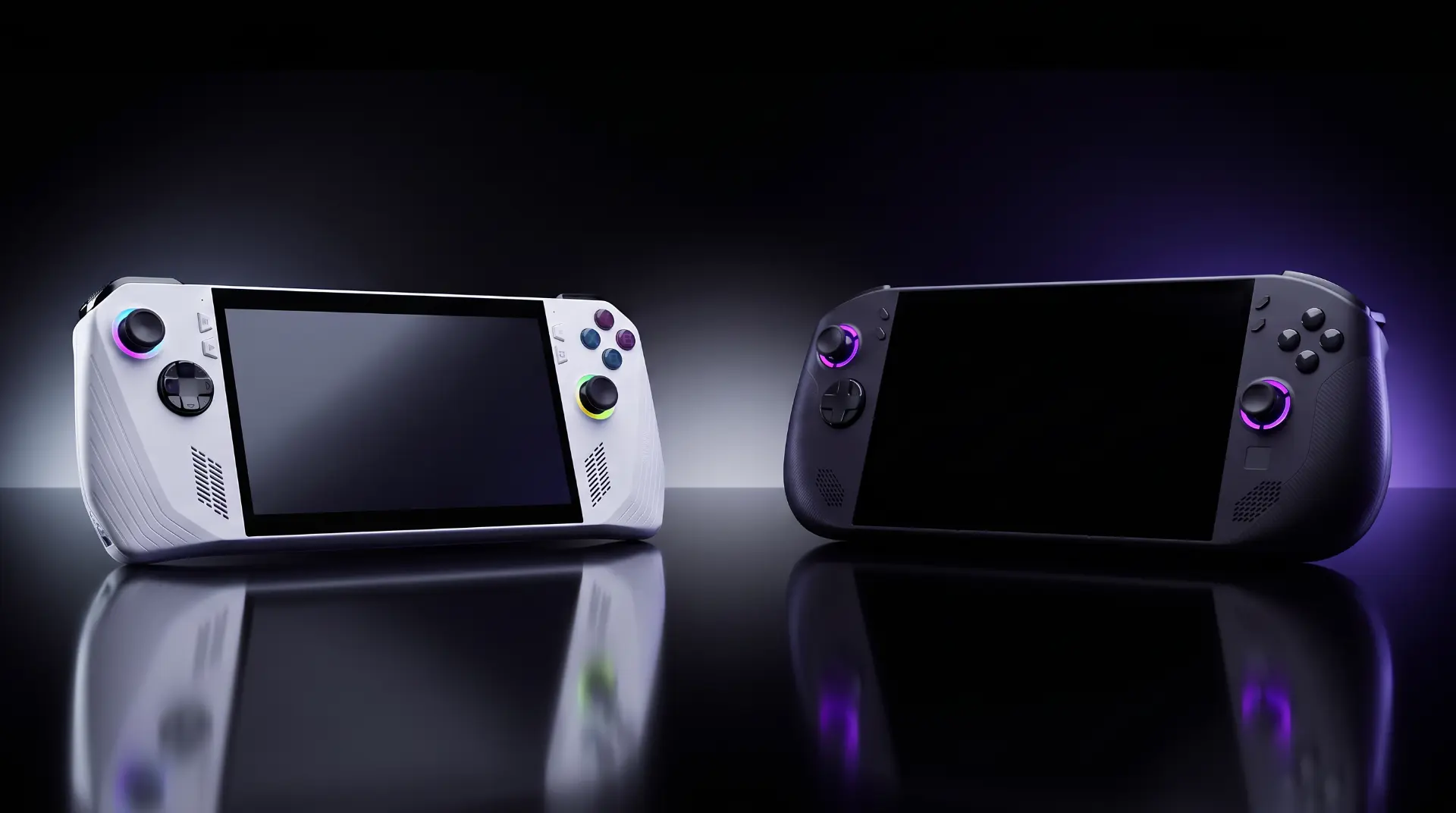
ASUS ROG Xbox Ally vs Lenovo Legion Go S: Budget Handheld Showdown
This post contains affiliate links. If you purchase through these links, I may earn a small commission at no extra cost to you. This helps support the site and allows me to continue creating honest comparisons like this one. All opinions are my own.
The Matchup
The handheld gaming PC market has exploded, and if you're shopping under $700, two devices keep coming up: the ASUS ROG Xbox Ally and the Lenovo Legion Go S. Both are powered by AMD's budget-tier Z2 processors, both run Windows 11, and both promise a portable PC gaming experience without the premium price tag of their bigger siblings (the ROG Xbox Ally X and Legion Go 2).
But here's the thing — these aren't the same device with different logos. The ROG Xbox Ally leans into the Xbox ecosystem with a dedicated partnership, a built-in Xbox Full Screen Experience, and a bundled Game Pass subscription. The Legion Go S fights back with a bigger 8-inch display, Hall Effect joysticks, USB4 ports, and a more powerful Z2 Go chip. They're targeting the same wallet, but from different angles.
If you're a casual gamer looking for a portable way to play your Steam and Xbox libraries without spending $800+, this is the comparison that matters. I dug deep into both to find out which one actually delivers where it counts.
Quick Specs Comparison
| Spec | ROG Xbox Ally | Legion Go S |
|---|---|---|
| Processor | AMD Ryzen Z2 A (Zen 2, 4C/8T, up to 3.8 GHz) | AMD Ryzen Z2 Go (Zen 3+, 4C/8T, up to 4.3 GHz) |
| GPU | AMD Radeon RDNA 2, 8 Compute Units | AMD Radeon 680M RDNA 2, 12 Compute Units |
| RAM | 16 GB LPDDR5X-6400 | 16 GB or 32 GB LPDDR5X-6400 |
| Storage | 512 GB M.2 2280 SSD | 512 GB or 1 TB M.2 2242 SSD |
| Display | 7" IPS, 1920×1080, 120 Hz, VRR | 8" IPS, 1920×1200 (16:10), 120 Hz, VRR |
| Battery | 60 Wh | 55.5 Wh |
| Weight | 670 g (1.48 lbs) | 730 g (1.61 lbs) |
| Ports | 2× USB 3.2 Gen 2 Type-C, microSD, 3.5mm | 2× USB4 Type-C, microSD, 3.5mm |
| Wireless | Wi-Fi 6E, Bluetooth 5.3 | Wi-Fi 6E, Bluetooth 5.3 |
| Extras | Fingerprint reader, Xbox Game Pass (3 mo.) | Hall Effect sticks, touchpad |
| OS | Windows 11 Home + Xbox Experience | Windows 11 Home (SteamOS version available) |
| MSRP | $599 (often on sale ~$499) | $599 (16GB/512GB) / $729 (32GB/1TB) |
Head-to-Head Breakdown
Performance
Let's cut right to it — the Legion Go S has the more powerful chip. The Ryzen Z2 Go uses AMD's newer Zen 3+ architecture with 12 RDNA 2 compute units, compared to the ROG Ally's older Zen 2 with just 8 CUs. In Geekbench 6, the Legion Go S scores around 6,047 versus roughly 3,950 for the ROG Ally. That's a significant gap on paper.
In actual games, the Legion Go S pulls ahead too. At 800p, it pushes around 56 fps in Forza Horizon 5 and 35 fps in Cyberpunk 2077. The ROG Ally with its Z2 A chip was benchmarked as "slower than the Steam Deck OLED" by Notebookcheck, and the Steam Deck OLED typically hits around 30-35 fps in Cyberpunk at comparable settings. Both devices struggle with demanding AAA titles at native resolution — you'll want to drop to 720p or 800p for a smooth experience on either one.
Edge: Legion Go S — The Z2 Go's newer architecture and 50% more GPU compute units give it a meaningful performance advantage.
Display
The Legion Go S wins this one convincingly. Its 8-inch, 16:10 panel gives you noticeably more screen real estate — roughly 30% more viewing area than the ROG Ally's 7-inch, 16:9 display. The higher 1920×1200 resolution and measured brightness of 455-539 nits (depending on the review) delivers vibrant, punchy colors with 84.8% DCI-P3 coverage.
The ROG Ally's 7-inch 1080p display is still solid — it's sharp at 315 PPI, supports VRR and FreeSync Premium, and spec'd at 500 nits — but several reviewers noted that measured brightness fell short of that claim. It's perfectly fine for gaming, but side by side, the Legion Go S screen is the one you'd rather stare at for hours.
Edge: Legion Go S — Bigger, wider aspect ratio, better color accuracy, and brighter in practice.
Battery Life
This is where the ROG Ally claws back serious ground. Its 60 Wh battery is roughly 8% larger than the Legion Go S's 55.5 Wh cell, but the real story is the less power-hungry Z2 A chip. Because the Zen 2 processor draws less power than the Z2 Go, the ROG Ally stretches its battery further — particularly in lighter gaming and general use.
The Legion Go S consistently delivers around 1 hour 40 minutes of demanding gaming on a charge, with lighter titles pushing that closer to 2 hours. Web browsing gets you about 8.5 hours. The ROG Ally, with its less power-hungry chip and bigger battery, should edge past the Legion Go S in gaming scenarios. Both devices are disappointing if you're used to the Steam Deck OLED's 3+ hour gaming sessions, but the ROG Ally has the advantage here.
Edge: ROG Xbox Ally — Bigger battery combined with a less power-hungry processor means more gaming time away from the charger.
Build Quality & Comfort
Both handhelds feel well-made, but they take different approaches to ergonomics. The ROG Ally at 670g is 60g lighter than the Legion Go S at 730g — that might not sound like much, but you feel it during hour-long handheld sessions. The Ally's redesigned grips (compared to the original ROG Ally) are more comfortable, though some reviewers noted the back buttons can dig into your grip.
The Legion Go S counters with rounder, thicker grips that keep back buttons out of the way, Hall Effect thumbsticks that won't develop drift over time, and a touchpad that's handy for desktop navigation. The ROG Ally skips the touchpad but includes a fingerprint reader for quick logins. Both devices have easily accessible M.2 SSD slots for storage upgrades.
Edge: Tie — The Ally is lighter and more compact; the Legion Go S has better controls and a touchpad. It comes down to what you prioritize.
Software & Ecosystem
This is where the ROG Xbox Ally has a genuine differentiator. The partnership with Microsoft means a dedicated Xbox button, a seamless Xbox Full Screen Experience that makes it feel like a portable Xbox, deep Xbox Game Pass integration, and a bundled 3-month Game Pass subscription. If you're already in the Xbox ecosystem, it's a remarkably smooth experience.
The Legion Go S runs Windows 11 with Lenovo's Legion Space overlay, which multiple reviewers called "finicky" and limited in its control over AMD features. However, there's also a SteamOS version available at $499, which gives you the Steam Deck's polished, console-like experience at a budget price. That SteamOS option is a compelling alternative if you primarily game through Steam.
Edge: ROG Xbox Ally — The Xbox integration is genuinely excellent, and Game Pass is incredible value. The Legion Go S's SteamOS version is a strong counter, but the Windows version's software falls short.
Value
At MSRP, the ROG Xbox Ally and the base Legion Go S (16GB/512GB) both list at $599. But the real-world picture favors the ROG Ally — it frequently drops to $499 during sales (a $100 discount that happens regularly), and it includes 3 months of Xbox Game Pass. The Legion Go S at $599 gives you the same 16GB RAM and 512GB storage but sees smaller discounts. The 32GB/1TB Legion Go S jumps to $729, which is a tough sell given the gaming performance.
The wildcard is the Legion Go S SteamOS edition at $499, which undercuts both on price and delivers a more polished gaming-first OS. If you're a Steam-first gamer, that's the best dollar-for-dollar play in this matchup.
Edge: ROG Xbox Ally — More frequent sales, Game Pass bundle, and comparable specs at a lower real-world price. The SteamOS Legion Go S at $499 is the budget king, though.
ASUS ROG Xbox Ally — Pros & Cons
Pros
- Outstanding battery capacity — The 60 Wh cell is the largest in its price class and pairs with a power-sipping Z2 A chip for solid endurance
- Lightest in class at 670g — Noticeably easier to hold during long sessions compared to nearly every competitor
- Xbox ecosystem integration — The Full Screen Experience, dedicated Xbox button, and Game Pass bundle create a console-like feel that no other Windows handheld matches
- Frequent deep discounts — Regularly drops to $499, making it one of the best value handhelds on the market
- Fingerprint reader — Quick, secure logins without typing passwords on a tiny keyboard
- Two USB-C ports — Charge and connect peripherals simultaneously, with DisplayPort output for TV play
Cons
- Weakest processor in its class — The Zen 2-based Z2 A is a generation behind, and it shows in demanding games
- Smaller 7-inch display — Fine for portable gaming but noticeably tighter than 8-inch competitors
- No Hall Effect thumbsticks — Standard analog sticks mean potential drift over time
- No touchpad — Desktop navigation requires the touchscreen, which is clunky for non-gaming tasks
- Display brightness falls short — Measured brightness didn't hit the 500-nit spec in reviewer testing
Lenovo Legion Go S — Pros & Cons
Pros
- More powerful Z2 Go processor — Zen 3+ architecture with 50% more GPU compute units delivers meaningfully better gaming performance
- Gorgeous 8-inch display — The larger 16:10 panel with strong color accuracy is the best screen in the budget handheld class
- Hall Effect thumbsticks — Drift-proof joysticks that should last the life of the device
- USB4 ports — Future-proofed connectivity that supports eGPU docks and faster data transfer
- Touchpad included — Makes desktop-mode Windows navigation significantly less painful
- SteamOS version available — A $499 SteamOS option delivers a polished console-like experience for Steam gamers
Cons
- Disappointing gaming battery life — Around 1 hour 40 minutes under load is rough, even by handheld PC standards
- Heavier at 730g — The extra 60g over the ROG Ally adds up during extended play sessions
- Poor price-to-performance ratio — At $729 for the 32GB/1TB model, reviewers consistently felt the performance didn't justify the cost
- Legion Space software is finicky — Lenovo's game overlay offers limited control and frequently frustrates users
- No fingerprint reader — Minor but noticeable missing feature for quick logins
- Fan noise under load — Gets noticeably loud during demanding gaming sessions
Who Should Buy the ASUS ROG Xbox Ally
The ROG Xbox Ally is your pick if you want the most well-rounded budget handheld experience without overthinking it. If you're an Xbox Game Pass subscriber (or want to be), the integration here is seamless — it genuinely feels like a portable Xbox rather than a tiny Windows PC you're wrestling with. The lighter weight and bigger battery also make it the better travel companion.
It's also the smarter buy if you're price-sensitive. At its frequent $499 sale price with Game Pass included, it's arguably the best value in handheld gaming. Just know that you're trading raw performance for that value — AAA games will need lower settings, and the older Z2 A chip will show its age faster than the competition.
Who Should Buy the Lenovo Legion Go S
The Legion Go S makes sense if you prioritize screen quality and gaming performance above all else. That 8-inch display is genuinely excellent for handheld gaming — once you've played on it, the 7-inch screens feel cramped. The Z2 Go chip delivers noticeably better frame rates, and the Hall Effect sticks are a long-term reliability win.
Consider the SteamOS version at $499 if you're primarily a Steam gamer — it's the best budget handheld for that ecosystem. The Windows version at $599-$729 is a harder sell unless you need the extra RAM and storage for your workflow. This is the handheld for someone who treats their device like a mini gaming PC, not a portable console.
The Grades
ASUS ROG Xbox Ally: B+ — A well-rounded budget handheld that nails the fundamentals: great battery life, light weight, excellent Xbox integration, and outstanding value at its frequent sale price. The aging Z2 A processor is the one thing holding it back from an A.
Lenovo Legion Go S: B — Better specs on paper than the ROG Ally, with a standout display and future-proof features. But the disappointing battery life, finicky software, and questionable price-to-performance ratio (especially at $729) prevent it from fully capitalizing on its hardware advantages.
The Verdict & Overall Recommendation
Winner: ASUS ROG Xbox Ally
This was closer than I expected, but the ROG Xbox Ally takes it for one simple reason: it delivers a more complete, more polished experience for less money. At $499 on sale, you're getting a lighter device with a bigger battery, seamless Xbox integration, and a bundled Game Pass subscription that immediately gives you access to hundreds of games. The Z2 A processor is its weakest link, but for the types of games most handheld gamers actually play — indie titles, older AAA games, and Game Pass favorites — it handles the job.
The Legion Go S is the better hardware package on paper, and if raw performance and screen size are your top priorities, it's a legitimate pick — especially the $499 SteamOS version. But the Windows version's software issues, worse battery life, and higher real-world pricing make it a tougher recommendation for most buyers.
My advice: if you see the ROG Xbox Ally at $499 and you're even slightly interested in Xbox Game Pass, buy it. If you're a Steam-first gamer on a budget, grab the Legion Go S SteamOS edition. And if you can stretch your budget to $799+, skip both of these and look at the ROG Xbox Ally X or Steam Deck OLED — the performance jump is worth it.
Where to Buy
👉 Buy the ASUS ROG Xbox Ally on Amazon(Affiliate link — we may earn a commission at no extra cost to you.)
👉 Buy the Lenovo Legion Go S on Amazon(Affiliate link — we may earn a commission at no extra cost to you.)
As an Amazon Associate, I earn from qualifying purchases. Prices and availability are subject to change.
The Verdict
Two budget handheld gaming PCs go head-to-head — the Xbox-powered ROG Ally brings a bigger battery and lighter build, while the Legion Go S counters with a larger display and stronger chip. Here's which one deserves your money. Worth buying if it fits how you'll actually use it.
This post contains affiliate links. If you buy through one, I may earn a commission at no extra cost to you.