
ASUS ROG Xbox Ally Review: The Xbox Handheld That Almost Gets It Right
This post contains affiliate links. If you purchase through these links, I may earn a small commission at no extra cost to you. This helps support the site and allows me to continue creating honest reviews like this one. All opinions are my own.
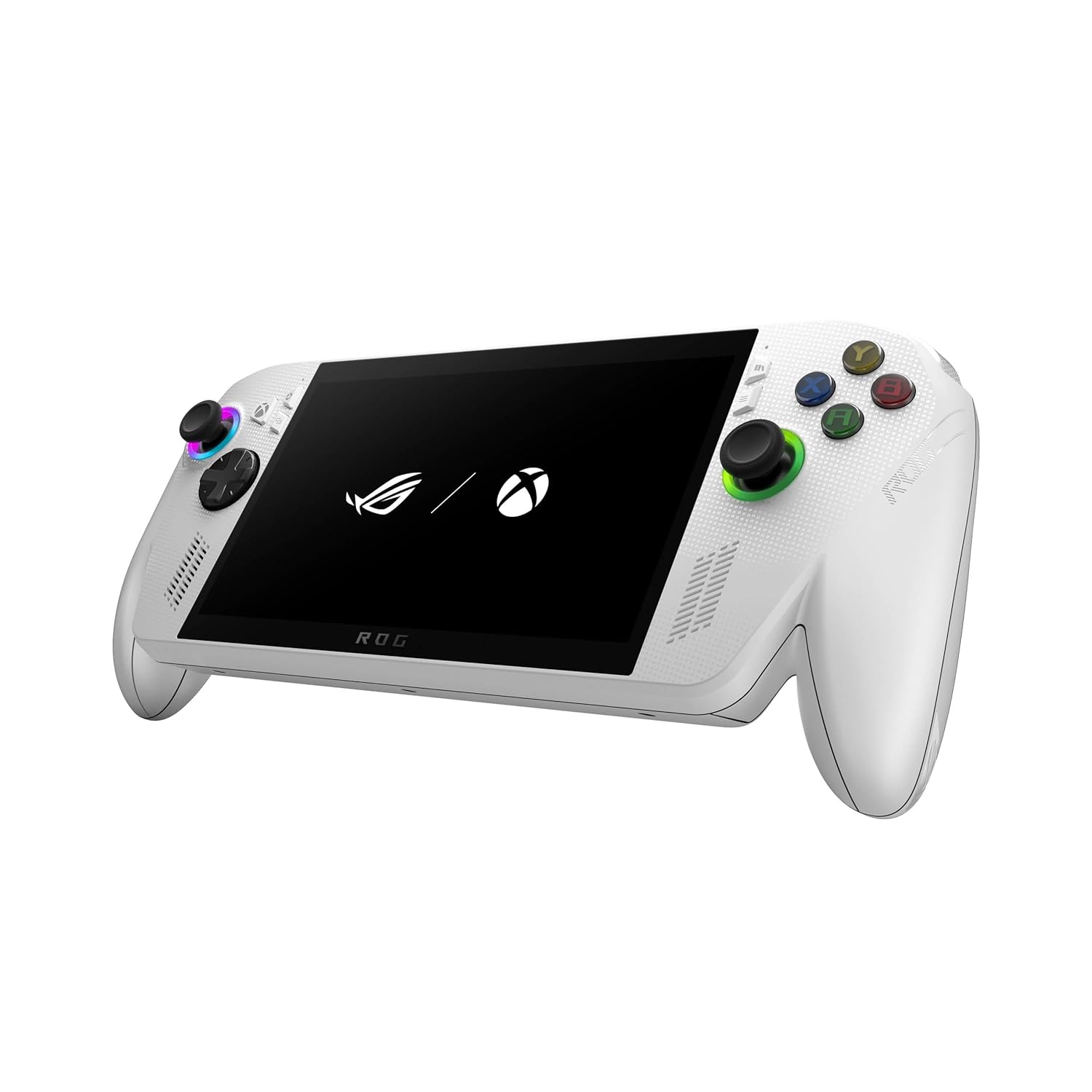
I've been waiting for someone to make a handheld that feels like picking up an Xbox controller and just playing — no fiddling with Windows desktops, no hunting for launchers, no feeling like you're gaming on a tiny laptop. The ASUS ROG Xbox Ally is Microsoft and ASUS's answer to that wish, wrapping a full Windows PC handheld in an Xbox-branded shell with a full-screen Xbox experience that boots you straight into your Game Pass library. On paper, it's exactly what the Xbox ecosystem has been missing. In practice? It's complicated.
The problem starts under the hood. While the Xbox branding and software experience are genuinely impressive, ASUS went with the Ryzen Z2 A chip — a budget processor that delivers roughly Steam Deck-level performance. That would be fine at a Steam Deck price, but at $499–$599, you're paying a premium for the Xbox coat of paint. Let me break down whether that premium is worth it for you.
Quick Specs
| Spec | Detail |
|---|---|
| Price | ~$499–$599 |
| Processor | AMD Ryzen Z2 A (4 Zen 2 cores/8 threads, up to 3.8 GHz, 20W TDP) |
| GPU | AMD Radeon (8 RDNA 2 CUs, up to 1.8 GHz) |
| RAM | 16GB LPDDR5X |
| Storage | 512GB NVMe SSD + microSD slot |
| Display | 7" IPS, 1920×1080, 120Hz, FreeSync Premium, ~500 nits |
| Battery | 60 Wh |
| Weight | 1.48 lbs (670g) |
| Dimensions | 11.42 × 4.76 × ~0.89 inches |
| OS | Windows 11 with Xbox Full-Screen Experience |
| Connectivity | Wi-Fi 6E, Bluetooth 5.2 |
| Ports | USB4/Thunderbolt 4, USB 3.2 Gen 2, 3.5mm audio, microSD |
| Controls | Hall Effect triggers & bumpers, 2 rear paddles, Xbox layout, no impulse triggers |
| Warranty | 1 year standard |
What Makes This Handheld Stand Out
The Xbox Experience Actually Works
This is the ROG Xbox Ally's ace card. Boot it up and you're dropped into a full-screen Xbox interface that's fully navigable with a controller — your Game Pass library, Xbox PC games, Microsoft Store titles, and even third-party launchers like Steam, EA Play, and Ubisoft Connect are all accessible without touching the Windows desktop. It genuinely feels like picking up an Xbox, not a Windows PC. For anyone who's wrestled with the Windows desktop on a Steam Deck competitor, this is a breath of fresh air.
Cloud Gaming Makes It Shine
Here's where the Z2 A chip's limitations stop mattering: Xbox Cloud Gaming through Game Pass Ultimate lets you stream AAA titles at 1080p/60fps without breaking a sweat. Games like Gears of War and Avowed ran beautifully via the cloud, and with Wi-Fi 6E on board, latency was minimal on a solid connection. If you're in an area with good internet, cloud gaming effectively turns this into a portable Xbox Series X.
The Controls Are Excellent
ASUS knows controllers. The Hall Effect triggers and bumpers mean zero drift concerns, the two rear paddles add customizable inputs, and the overall layout is pure Xbox comfort. The thumbsticks are responsive with a satisfying feel. The only miss is the lack of impulse triggers — the haptic feedback in the triggers that real Xbox controllers have. But for a handheld, the control experience is top-tier.
Bright, Sharp Display
The 7-inch 1080p IPS panel at 120Hz with FreeSync Premium hits about 500 nits of brightness and covers 96% sRGB. It's not OLED, but it's bright, color-accurate (Delta E of 0.61), and smooth. Games look crisp at native resolution for lighter titles, and the 120Hz refresh rate makes everything feel fluid.
The Pros
- Best-in-class Xbox integration — The full-screen Xbox experience is the most console-like software on any Windows handheld. Game Pass access is seamless.
- Excellent controls — Hall Effect triggers, rear paddles, and a true Xbox layout. No drift, great feel.
- Cloud gaming powerhouse — With Game Pass Ultimate and Wi-Fi 6E, demanding games stream at 1080p/60 without taxing local hardware.
- Bright, accurate display — 500 nits, 120Hz, FreeSync Premium, and excellent color accuracy for an IPS panel.
- Lightest in its class — At 670g, it's lighter than the Legion Go S (730g) and Steam Deck (669g for OLED, but thicker).
- Thunderbolt 4 support — Dock it with an eGPU for desktop-class gaming at home. Few handhelds offer this.
- Decent battery — The 60Wh cell outpaces the Steam Deck's 50Wh and delivers 2–3 hours of gaming depending on the title.
- Solid speakers — Multiple reviewers praised the audio quality as surprisingly good for a handheld.
The Cons
- Underpowered for the price — The Ryzen Z2 A is essentially a Steam Deck-class chip. Cyberpunk 2077 manages ~41fps at 720p with FSR. Doom: The Dark Ages hits only 23fps at 720p on low. You're paying $100–$200 more than a Steam Deck for similar local gaming performance.
- AAA games struggle locally — Anything released in the last two years will require significant graphical compromises. This is an indie/older game/cloud gaming machine, not a portable AAA powerhouse.
- Windows still breaks through — Despite the Xbox overlay, pop-ups, browser windows, and update prompts still interrupt gameplay. You can't fully escape Windows, and when it appears, controller navigation falls apart.
- No impulse triggers — Real Xbox controllers have haptic feedback in the triggers. This doesn't. For a device branded "Xbox," that's a notable omission.
- Armory Crate still required — Performance profiles and paddle mapping live in ASUS's separate Armory Crate app, not the Xbox interface. Two apps to manage one device.
- 16GB RAM feels tight — Windows 11 eats into that 16GB, leaving less for games. Competitors like the Legion Go S ship with 32GB at a similar price.
- No biometric login — No Windows Hello, no fingerprint reader. You're entering a PIN every time you wake it up. On a device meant to feel like a console, that's a friction point.
- Can't play Xbox console games — Despite the branding, you can't play Xbox disc or digital console games. Only PC titles and Play Anywhere games work. This will confuse buyers.
Who Should Buy This
If you're deep in the Xbox ecosystem — Game Pass subscriber, Xbox friends list, achievements matter to you — and you want a portable way to access that library, the ROG Xbox Ally delivers an experience no other handheld matches. It's also the right pick if cloud gaming is your primary play style; the hardware is almost secondary when you're streaming, and the Xbox interface makes it feel like a real console. Indie game fans and anyone who plays a lot of older/less demanding titles will find the Z2 A chip perfectly adequate, and the controls and display make lighter games genuinely enjoyable. If you catch it at the $499 price point, it's a reasonable entry into handheld PC gaming with the most polished software experience on Windows.
Who Should Look Elsewhere
If you want to play the latest AAA games locally at decent frame rates, this isn't your device. The Steam Deck OLED ($549) delivers similar local performance with a gorgeous OLED display and purpose-built SteamOS that doesn't fight you. The ASUS ROG Ally X ($799) uses the much more powerful Z1 Extreme chip and 24GB of RAM — it costs more but actually handles demanding games. And if ergonomics and raw power matter most, the Lenovo Legion Go S Z1 Extreme (~$830 on sale) pairs a powerful chip with the most comfortable handheld design on the market. Bottom line: the Xbox Ally's appeal is the ecosystem integration, not the hardware. If you don't care about Game Pass or Xbox features, better-performing options exist at every price point.
The Competition
| Feature | ROG Xbox Ally | Steam Deck OLED 512GB | ROG Ally X | Legion Go S (Z1 Extreme) |
|---|---|---|---|---|
| Price | ~$499–$599 | ~$549 | ~$799 | ~$830 on sale |
| Processor | Ryzen Z2 A (4c/8t) | Custom AMD APU (4c/8t) | Ryzen Z1 Extreme (8c/16t) | Ryzen Z1 Extreme (8c/16t) |
| RAM | 16GB | 16GB | 24GB | 32GB |
| Display | 7" IPS, 1080p, 120Hz | 7.4" OLED, 800p, 90Hz | 7" IPS, 1080p, 120Hz | 8" IPS, 1200p, 120Hz |
| Battery | 60 Wh | 50 Wh | 80 Wh | 55.5 Wh |
| Weight | 670g | 669g | 678g | 730g |
| OS | Windows 11 + Xbox | SteamOS | Windows 11 | Windows 11 |
| Best For | Xbox fans, cloud gaming | Best overall value | Power + battery | Ergonomics + power |
The Verdict
The ASUS ROG Xbox Ally is the best Xbox experience you can get in a handheld, and it's not particularly close. The full-screen Xbox interface, seamless Game Pass integration, and console-like boot experience genuinely deliver on the promise of "Xbox in your hands." The controls are excellent, the display is bright and sharp, and cloud gaming transforms it into something far more capable than its local hardware suggests.
But that local hardware is the elephant in the room. The Ryzen Z2 A chip puts this device in Steam Deck territory for raw gaming power, while the price tag sits $100–$200 above Valve's offering. You're paying a premium for the Xbox software experience and ASUS's build quality, not for performance. If cloud gaming isn't part of your plan, the value proposition crumbles quickly — the Steam Deck OLED gives you similar performance with a better display and better handheld OS for less money.
My honest take: this is a 3/5 product that becomes a 4/5 for the right buyer. If "Xbox Game Pass portable" is what you want, nothing else comes close. If "best handheld gaming PC for the money" is what you want, look elsewhere.
Rating: 3/5 — A polished Xbox experience trapped in underpowered hardware. Great for Game Pass fans and cloud gamers; hard to justify for anyone else.
Deal Tip 💡 The ROG Xbox Ally has been spotted at $499 at multiple retailers — that's the price to buy at. At $599, the value gap with the Steam Deck OLED ($549) is uncomfortably narrow. Also keep an eye on Game Pass Ultimate deals — a discounted annual sub maximizes the cloud gaming that makes this device sing. And if you see the ROG Ally X on sale below $700, seriously consider stepping up for the massive performance jump.
The Verdict
An Xbox-branded Windows handheld that nails the console-like experience but stumbles on raw power — best for Game Pass enthusiasts and cloud gaming, not AAA local play. Worth buying if it fits how you'll actually use it.
This post contains affiliate links. If you buy through one, I may earn a commission at no extra cost to you.